
Ubuntu OVAL data
The Canonical Security Team produces Ubuntu OVAL, a structured, machine-readable dataset for all supported Ubuntu releases. You can use it to evaluate and manage security risks related to any existing Ubuntu components. It’s based on the Open Vulnerability and Assessment Language (OVAL).
How Ubuntu OVAL data works
As software vulnerabilities are discovered, MITRE and other organizations assign CVE identifiers. Canonical triages these CVEs to determine whether the vulnerabilities affect software distributed within Ubuntu. We use the results of this triage to generate the CVE OVAL. You can use the CVE OVAL to assess the local system for vulnerabilities.
When the Ubuntu Security Team patches software to address one or more CVEs, we publish an Ubuntu Security Notice (USN) announcing the update. We generate the USN OVAL data from information encapsulated within the USN, and you can use it to assess the system for missing patches.
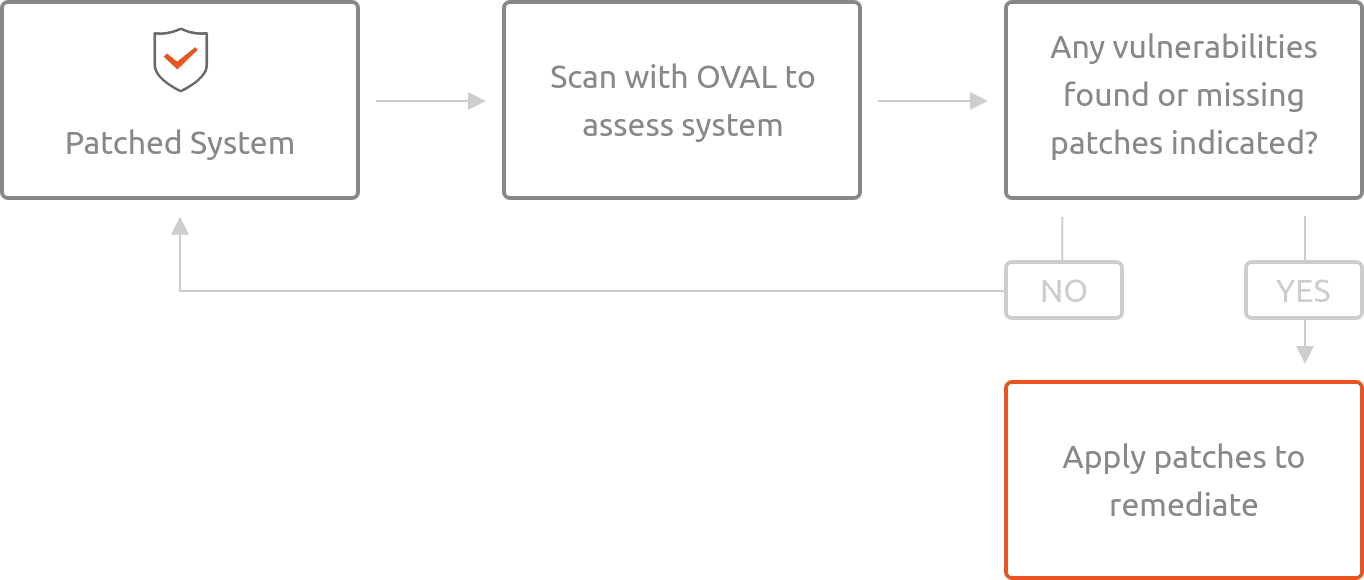
Using Ubuntu’s OVAL data
Using OpenSCAP
Download the compressed XML:
wget https://security-metadata.canonical.com/oval/com.ubuntu.$(lsb_release -cs).usn.oval.xml.bz2
Uncompress the data:
bunzip2 com.ubuntu.$(lsb_release -cs).usn.oval.xml.bz2
Use OpenSCAP to evaluate the OVAL and generate an HTML report:
oscap oval eval --report report.html com.ubuntu.$(lsb_release -cs).usn.oval.xml
The output is generated in the file
report.html. Open it using your browser:xdg-open report.htmlFile naming convention:
com.ubuntu.<example release name>.usn.oval.xml.bz2
Scanning an Official Cloud Image
To scan an Ubuntu Official Cloud Image for known vulnerabilities, you can use
the manifest file and XML data together. Unlike the previous example where we
used the lsb_release command, you must manually enter the URL for the OVAL
data.
Note
In the example below, we use Ubuntu 20.04 LTS (Focal Fossa). Replace
focal with the version you are inspecting.
Download the OVAL USN data:
wget https://security-metadata.canonical.com/oval/oci.com.ubuntu.focal.usn.oval.xml.bz2
bunzip2 oci.com.ubuntu.focal.usn.oval.xml.bz2
Download the manifest file for the image:
wget -O manifest https://cloud-images.ubuntu.com/releases/focal/release/ubuntu-20.04-server-cloudimg-amd64-root.manifest
Use OpenSCAP to evaluate the OVAL and generate an HTML report:
oscap oval eval --report report.html oci.com.ubuntu.focal.usn.oval.xml
The output is generated in the file
report.html. Open it using your browser:xdg-open report.htmlFile naming convention:
oci.com.ubuntu.<example release name>.usn.oval.xml.bz2
Ubuntu OVAL data parameters
Parameter |
Description |
|---|---|
CVE_ID |
CVE number as reported by MITRE |
USN |
Corresponding Ubuntu Security Notice |
Description |
A short description of the security risk addressed |
Severity |
CVE or USN severity as defined by the Ubuntu Security team |
Affected Platform |
Affected Ubuntu release(s), including ESM |
Title |
CVE number, affected Ubuntu release(s), and Severity |
Public date |
The date on which a CVE was publicly announced |
Public date of USN |
The date on which a USN was published |
Reference |
Links to more information about the issue |
BugReport |
Link to bug report about the issue |
Note
The above parameters are included in the OVAL XML file, but not all are shown in the resulting generated OpenSCAP report.